
When you spend all day creating content for SEO, you don’t have time to test every new tool that shows up. Yet one question keeps popping up in meetings, Slack threads, and late night research sessions. Is Gemini better than ChatGPT. The real answer is not a simple yes or no.
It depends on what job you need done, whether you live inside Google’s tools, and how much you hate fixing tiny factual mistakes that slip into AI drafts. This piece walks you through what actually happens when you use both assistants for real marketing work writing, research, coding, and daily busywork so you can pick the one that helps you rank better and work faster.
What Is the Difference Between Gemini and ChatGPT?
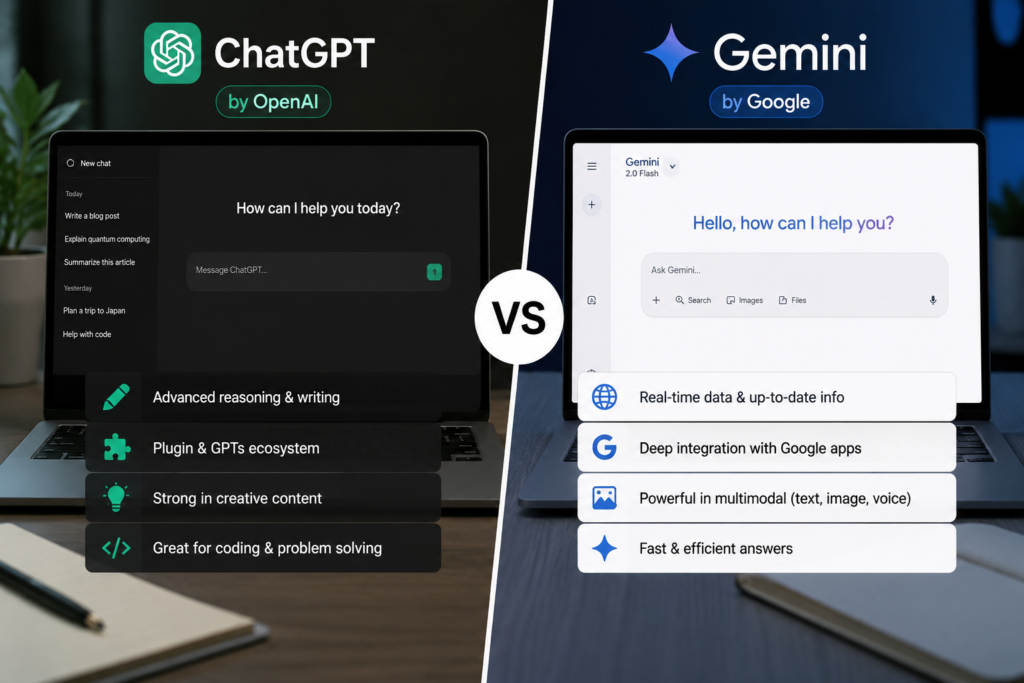
Think of Gemini and ChatGPT as two different kinds of coworkers. One grew up inside Google, with direct access to Search, YouTube, Gmail, and Docs. The other grew up as a pure text thinker, and only later learned to see images, hear voice, and browse the web.
Gemini, made by Google DeepMind, was designed from day one to handle text, pictures, audio, video, and code all together in one brain. That means it can look at a chart inside a PDF and write a paragraph about it without needing extra steps.
ChatGPT, built by OpenAI, started as a text engine that got extremely good at understanding tone, following instructions, and explaining things step by step. It gained vision and voice later, but its real strength is still the way it strings words together.
The other big difference is memory. Gemini’s top model can hold up to a million tokens in mind at once roughly 1,500 pages of content. ChatGPT’s memory is shorter. If your work involves massive documents or huge piles of competitor content, that gap alone can decide which tool you reach for.
Is Gemini Actually Better Than ChatGPT?
Short answer: no, not always. And yes, sometimes it definitely is. It all depends on the task in front of you.
When Gemini wins
Gemini really shows its value when your whole workday revolves around Google. It can look at your Drive files, summarize emails from Gmail, and pull live stats from Search without you leaving the chat. For content writers and SEO teams, the “double check” feature is a big deal.
Gemini highlights parts of its answer in green if the web backs them up, or orange if the evidence is thin. This cuts down on fact checking time, which matters a lot when you are writing about medical topics, financial advice, or anything Google’s quality raters would scrutinize. And if you need to compare a hundred competitor blog posts at once, that huge context window makes Gemini the clear choice.
When ChatGPT wins
ChatGPT shines when you need writing that sounds human, carries emotion, and adjusts to a specific brand voice. It follows detailed style instructions better, so if you want witty social posts, warm email sequences, or punchy ad copy, ChatGPT usually gives you a cleaner first draft. The Custom GPTs feature lets you build mini assistants trained on your own style guide, keyword list, and content templates.
Developers also lean on ChatGPT heavily because it explains bugs clearly, tries out code in a sandbox, and rarely loses the thread during a long troubleshooting session. For creative brainstorming, it feels more like bouncing ideas off a real person.
Why there isn’t one perfect AI for everyone
Your tool stack shapes your experience. A content agency running on Google Workspace will save hours with Gemini just by avoiding copy paste between apps. A marketing team using Slack, Notion, and a bunch of custom dashboards might find ChatGPT’s integrations and custom bots more flexible.
No tool wins every fight. The smartest approach many agencies take is using Gemini to gather research and check facts, then switching to ChatGPT when it is time to polish the words.
Feature by Feature Comparison
Here is how both tools handle the tasks content teams face every single day.
Writing Quality and Content Creation
ChatGPT produces writing that flows more naturally and can shift between tones like a skilled copywriter. Give it a brand voice guide, and it will stick to it across a long article. Gemini writes clear, accurate, well organized content, but it can sound a bit flat or encyclopedia like. For straightforward SEO blog posts that need to be factually solid and easy to scan, Gemini works well. For storytelling, landing pages, and anything meant to build connection, ChatGPT has the edge.
Image Generation
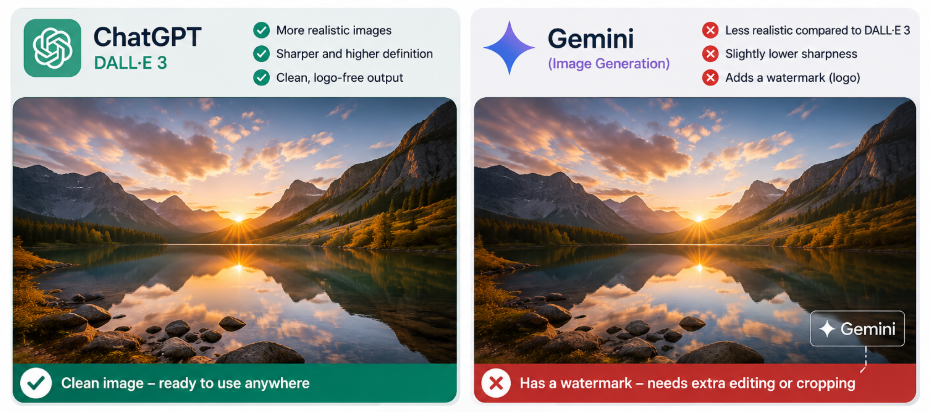
In my own day to day use, though, I have noticed that ChatGPT’s DALL·E 3 images consistently look more realistic and come out in sharper, higher definition than Gemini’s. There is also a practical friction that bothers many users, Gemini stamps a small logo in the bottom right corner of every image it generates, while ChatGPT gives you a completely clean, logo free result.
That little watermark means you either crop it out or spend extra time editing, which breaks the flow when you are rushing to publish a post. ChatGPT’s clean output makes grabbing an image and dropping it straight into a blog or social media much easier, and that convenience often outweighs the text inside image advantage in daily content work.
Voice Conversations
Both tools let you talk to them out loud. ChatGPT’s voice mode sounds more human, with natural pauses and emotion, and it handles interruptions well. Gemini’s voice mode works fine and integrates deeply with Android phones, which is handy if you ask quick questions while driving or walking. For practicing a presentation or doing a mock interview, ChatGPT feels more like a real conversation.
Video Generation
Video creation is still very new in both camps. Google has started to roll out video generation through a model called Veo, which you can control through Gemini. It creates short clips from text descriptions. ChatGPT does not offer video generation natively yet. For marketers experimenting with short form video ideas, Gemini gives you a head start, but the technology still needs a human to turn the output into something publishable.
Reasoning and Problem Solving
ChatGPT walks through problems out loud, step by step. When you hand it messy data or a tricky strategy question, it shows its work so you can catch mistakes early. Gemini solves problems fine but sometimes skips straight to an answer without showing how it got there. The gap has narrowed, though, and when the problem needs current web data to solve it properly, Gemini often ends up with a more relevant answer.
Coding and Programming Assistance
For scripting SEO automation, fixing tracking code, or building small custom tools, developers usually prefer ChatGPT. It patiently explains what went wrong and how to fix it, and it can run code to test the solution. Gemini writes good code and can hold your entire codebase in memory, which is handy for massive refactoring jobs. Day to day, though, the interactive debugging experience still tilts toward ChatGPT.
Research and Finding Information
This is where Gemini feels like a real research assistant. Because it is connected to Google Search by default, it pulls in fresh information and often shows you exactly where it found each piece. The verification highlights let you quickly see which facts are solid and which need double checking.
ChatGPT can browse the web too, but you must turn it on manually, and the results can be hit or miss. If your content needs to pass an editor’s fact check, Gemini saves more time.
File Analysis and PDFs
Gemini reads enormous files without cutting corners. Drop a 400 page SEO audit PDF into the chat, ask about a specific section on page forty seven, and it finds and analyzes that section directly. ChatGPT handles spreadsheets and structured data beautifully through its code interpreter but can struggle with very long, messy documents. Legal contracts, research papers, and deep content inventories are Gemini’s home turf.
Long Context Handling
The million token window changes the game. You can upload a full year of blog posts, analytics reports, and customer emails, then ask Gemini to spot seasonal patterns and suggest your next quarter’s content plan all in one go. ChatGPT forces you to split huge projects into pieces, and you risk losing cross document insights along the way. When the job demands holding a mountain of information in mind at once, Gemini is the only practical choice.
Which AI Gives More Accurate Answers?
Accuracy is everything when your content affects rankings and client trust. Both tools make things up sometimes. How they handle that risk is what sets them apart.
Hallucinations
Every large language model invents facts occasionally names, numbers, quotes that sound perfect but are completely wrong. ChatGPT tends to deliver these fabrications with supreme confidence, wrapped in beautiful sentences that can fool a quick reader. Gemini, because it leans on live search results, makes fewer factual inventions on topics with strong web coverage. Still, no AI output should ever go live without human eyes on it.
Fact checking
Gemini has a button that checks its own answer against the web. It highlights statements in green when lots of sources agree, orange when support is mixed, and leaves unsupported claims unmarked. This gives you a quick visual map of what needs more research. ChatGPT has no native fact check button. You must verify everything yourself or prompt it to re examine its own output, which adds steps to your workflow.
Live web information
Gemini pulls live data automatically for many queries. You get today’s stats, not last year’s. ChatGPT can access the web if you tell it to, but the experience feels less smooth and the retrieval quality varies. For SEO analysts tracking algorithm shifts, or content managers updating seasonal landing pages, Gemini’s access to the live web is more dependable.
Source citations
Gemini often includes clickable source cards at the end of its answers. You can trace a claim back to the original page, which helps you build proper citations and avoid accidental duplication. ChatGPT can list sources when asked, but those sources sometimes lead nowhere or point to pages that do not say what it claims. If your publishing process needs verifiable references, Gemini’s approach lowers your editorial risk.
Which AI Is Better for Everyday Productivity?
Different roles need different strengths. Here is how each tool serves real people.
Students
For digging up academic sources and recent papers, Gemini’s live search helps. For refining arguments, improving writing flow, and brainstorming thesis angles, ChatGPT shines. Using both covers the whole research and write cycle.
Writers
Copywriters crafting brand stories, ads, and emotional hooks will prefer ChatGPT’s stylistic range. Writers producing fact heavy SEO articles and product roundups will find Gemini faster for gathering stats and verifying claims.
Developers
ChatGPT is the coding partner most developers trust for debugging and explaining solutions. Gemini’s code skills are solid, but the step by step problem solving experience still favors ChatGPT.
Business Professionals
If your company runs on Google Workspace, Gemini is transformative. It drafts emails, summarizes threads, and builds presentation outlines right inside the tools you already have open. ChatGPT excels at strategic memos, market analysis, and any communication where persuasion and tone matter most.
Researchers
Gemini processes huge volumes of papers and cross checks findings against the live web, cutting literature review time significantly. ChatGPT helps synthesize ideas and generate fresh hypotheses. A dual tool approach gives you both efficiency and insight.
Gemini vs ChatGPT Inside Their Ecosystems
The productivity boost you feel depends entirely on where your data lives.
Gemini with Google Workspace
Gemini sits inside Gmail, Docs, Sheets, Slides, and Drive. You can ask it to draft a document, rewrite a section, or pull data from a spreadsheet without switching tabs. For an SEO team, that means researching a topic in Gemini chat, dropping that research straight into a Doc, refining it, and collaborating with editors all within a system that respects your existing sharing permissions. This cuts context switching and keeps sensitive files inside your company’s security fence.
ChatGPT with Custom GPTs and Integrations
ChatGPT’s superpower is its Custom GPTs. You can build a small assistant trained on your brand voice, target keywords, and content format rules. That assistant then produces meta descriptions, outlines, or social posts that need very little editing. ChatGPT also connects to tools like Slack, Notion, and Airtable through Zapier. If your team works across many different apps, this flexibility is priceless.
Which ecosystem saves more time?
If your business already lives in Google Workspace, Gemini saves you the constant small friction of moving data from place to place. If your team’s tool stack is varied and you want to automate repeatable content tasks, ChatGPT’s custom assistants and integrations will pay back the time you invest in setting them up. Many shops end up using Gemini for internal documents and research, and ChatGPT for client facing creative work.
Which AI Is Faster?
Speed is not just about how quickly the words appear. It is about how fast you get to a publishable final version.
Response speed
For simple requests like “summarize this page” or “write a short product description,” Gemini often returns results a few seconds quicker. Those seconds pile up when you process a lot of content in a day. ChatGPT’s speed varies, especially when it is doing web searches or data analysis at the same time.
Large document processing
Gemini’s million token context lets it handle a huge file in one shot. Uploading a massive PDF and getting a structured summary in under half a minute is a real time saver. ChatGPT requires you to break big files into pieces and process them in chunks, which adds manual work and time. For research heavy roles, Gemini can shave hours off document work each week.
Real world workflow
True speed is measured in edit distance: how much you must change before you hit publish. Sometimes ChatGPT gives you a draft that needs less stylistic fixing, while Gemini gives you one that needs less factual fixing. The faster path depends on whether your bottleneck is tone or accuracy.
Which AI Offers Better Free Features?
Cost matters, especially for freelancers and small agencies testing the waters.
Free limits
Gemini’s free plan is surprisingly capable. You get file uploads, image generation, and access to many extensions without paying. ChatGPT’s free tier is solid but locks away features like web browsing, DALL·E, and data analysis, which means you hit walls faster in a professional workflow.
Premium plans
ChatGPT Plus opens up the full toolkit browsing, image creation, code interpreter, and Custom GPTs for a monthly subscription. Google One AI Premium includes Gemini Advanced, the million token window, and deep Workspace integration at a similar price. Both deliver strong value, but in different directions.
Best value for money
If you constantly deal with long documents, live research, and live inside Google’s apps, Gemini Advanced gives you more for your money. If you need flexible writing, coding help, and the power to build custom assistants, ChatGPT Plus is worth the cost. For teams that can afford both, the combined subscription covers nearly every professional need without overlap.
Privacy and Data Handling
When you handle client data and content strategies, you need to know where your information goes.
Conversation history
ChatGPT saves your chat history so you can pick up where you left off. You can delete sensitive threads manually. Gemini works similarly and also gives you auto delete options. Turning off history on either platform disables personalization features.
Personalization
ChatGPT remembers details you share your brand guidelines, audience profile, project goals so you spend less time repeating context. Gemini’s personalization connects more to your Google account data when you enable extensions, meaning it knows your emails, calendar, and documents. That context is powerful but feels different; ChatGPT gives you more manual control, while Gemini leverages your existing Google footprint.
Workspace permissions
On Google Workspace with Gemini, admin settings ensure AI queries respect your document access permissions. ChatGPT Team and Enterprise give similar admin controls, encryption, and compliance coverage. Both are suitable for agencies bound by NDAs and data regulations.
What users should know
Do not paste raw, sensitive client data into consumer grade AI chats unless you are on an enterprise plan that guarantees data isolation. Check each provider’s data usage policy. Both Google and OpenAI offer opt outs for training data usage in their business tiers, which is a critical setting for anyone managing confidential marketing information.
Pros and Cons of Gemini
Pros
- One million token context handles massive files without breaking them apart
- Live Google Search grounding cuts down on made up facts and speeds up verification
- Works seamlessly inside Gmail, Docs, Drive, and Sheets
- Understands images, audio, video, and text together from the ground up
- Source links make it easy to build credible citations
- Strong free tier that does not lock away essential features
Cons
- Writing can feel dry and is harder to mold into a playful or unique brand voice
- Reasoning steps are not always shown, which can hide how it reached a conclusion
- Fewer customization options outside the Google world
- Video generation is still early and not reliable for professional output yet
- Fewer third party app connections compared to ChatGPT’s ecosystem
Pros and Cons of ChatGPT
Pros
- Exceptionally natural, versatile writing that fits many tones and styles
- Top tier coding help that explains bugs, tests solutions, and stays patient
- Custom GPTs let you build mini assistants for any repeatable content task
- Strong brainstorming partner for strategy and creative planning
- Wide integration network through plugins, API, and Zapier
- Voice conversations that feel genuinely human and expressive
Cons
- Smaller context window forces you to chop up large projects, risking lost insights
- Web browsing is inconsistent and requires extra steps to activate
- No built in fact check highlights; confident false claims can slip through
- Free tier locks away the features that make it most useful professionally
- Custom GPT quality depends heavily on how well you set them up
Should You Switch from ChatGPT to Gemini?
Switching tools carries a cost. New habits to form, old prompt libraries to rebuild. So only switch if the pain you are fixing is bigger than that cost.
Existing ChatGPT users
If you spend hours fact checking AI content or wrestling with enormous documents in pieces, try adding Gemini to your workflow for those specific tasks. You do not need to leave ChatGPT. Redirect the heavy research and document work to Gemini, and keep using ChatGPT for the writing and coding you already love. This targeted approach solves real problems without disrupting everything else.
Existing Gemini users
If your content pipeline is running fine but the writing feels a little flat or you miss having customized assistants for repeated jobs, ChatGPT works well as a second tool. Many Gemini users pull ChatGPT in for the final editing pass to inject life into the copy, or to build a Custom GPT that spits out weekly client reports in a precise, repeatable format.
When switching makes sense
Make Gemini your primary tool if your day revolves around Google Workspace, gigantic files, or live research that needs fast verification. Make ChatGPT your primary tool if you live inside creative copywriting, complex coding projects, or need to share reusable AI workflows across a team.
When it doesn’t
Stay put if your current output is good and your workflow doesn’t expose the other tool’s special strengths. The hidden price of switching rebuilding prompt collections, retraining team members, rewriting process docs often outweighs small performance bumps. Both platforms change fast. Waiting a few months can be smarter than jumping today.
Frequently Asked Questions
Is Gemini better than ChatGPT overall?
Neither platform is universally superior because each excels in different areas. ChatGPT remains the top choice for overall agentic automation, deep reasoning, and nuanced creative writing. Gemini shines when you need native integration with Google Workspace, seamless real time search, or the ability to process long documents and direct video inputs. Choosing between them comes down to whether you prioritize raw independent reasoning or deep ecosystem integration.
Which AI is better for creative writing and content creation?
ChatGPT holds a clear lead when it comes to creative writing and drafting long form prose. Its responses feel more expressive, natural, and tone adaptable, making it ideal for storytelling, essays, and persuasive copy. Gemini produces accurate and well structured responses, but its writing style leans more direct, factual, and concise, which can make long creative pieces feel a bit plain by comparison.
Which model handles video, audio, and large files better?
Gemini takes the lead in handling non text media because it was built from the ground up as a native multimodal model. This architecture allows Gemini to analyze raw video clips, process audio files, and read massive PDFs across an enormous context window. ChatGPT handles image generation, vision tasks, and interactive voice extremely well, but Gemini remains more capable when analyzing raw video content or huge datasets in a single prompt.
How do their ecosystem and app integrations compare?
The choice depends on whether you prefer Google’s connected services or an open workflow. Gemini plugs directly into your Google account, allowing you to pull details from Gmail, summarize Google Docs, or access Google Maps without switching screens. ChatGPT focuses on a broader setup using custom GPTs, desktop agent features, and broad third party tool integrations, making it ideal for users working across varied software stacks.
Which AI gives you the best experience on the free version?
Gemini generally offers a more full featured experience on its free tier. Google includes fast real time search, generous document processing limits, and access to core multimodal capabilities without strict daily cutoffs. ChatGPT also provides a powerful free experience, but access to its top tier reasoning capabilities and advanced data analysis features is meter limited, requiring paid tiers for heavier daily use.
Final Words
Picking between Gemini and ChatGPT is like picking between a powerful research library and a creative studio. Neither is better in a vacuum. For SEO pros and content marketers who need factual precision, live data, and the ability to process giant piles of content, Gemini offers things ChatGPT simply does not have. Its Google integration alone can save real hours each week.
The most productive teams we see are not choosing one and throwing the other away. They are matching each tool to the job it handles best, letting Gemini ground their research and ChatGPT lift their words. In a field where both assistants get smarter every month, the real advantage comes from knowing their strengths and using each without blind loyalty to a single brand.